Custom status lines for Claude Code
It’s vital to keep an eye on your remaining context window as you work with LLMs. Unfortunately, the current version of Claude Code doesn’t show that information until it’s arguably too late.
Claude Code supports a statusLine setting that runs a shell script and
displays its output at the bottom of your terminal. The script receives session
data as JSON on stdin and prints formatted text to stdout, so you can show
whatever matters to you.
I wanted mine to show four things: the current working directory, the exact
model I’m talking to (including 1M-context variants like opus[1m]), the
current effort level, and how much of the context window I’ve burned through.
That last one matters because I need to know when to
/coding:handoff before context runs out.
Want to skip the explanation? Jump to the setup prompt.
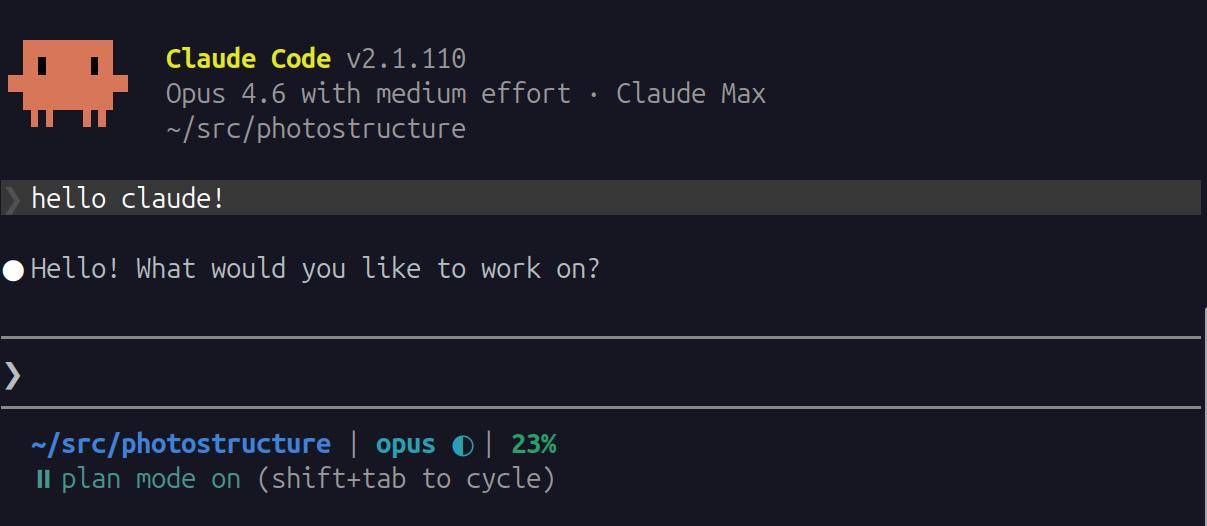
Claude Code status line showing current directory, model, effort, and context usage
The script
Create ~/.claude/statusline-command.sh:
#!/usr/bin/env bash
# Claude Code status line: cwd | model effort | context%

input=$(cat)

cwd=$(echo "$input" | jq -r '.workspace.current_dir')
cwd="${cwd/#$HOME/\~}"

# Prefer model.id from stdin JSON — it reflects the actual session model,
# including --model flag overrides. Fall back to settings.json for sessions
# that haven't made an API call yet (model.id may be absent).
model=$(echo "$input" | jq -r '.model.id // empty')
if [ -z "$model" ]; then
  model=$(jq -r '.model // empty' "$HOME/.claude/settings.json" 2>/dev/null)
fi
# Strip the "claude-" prefix and version suffix for display
# (e.g. "claude-sonnet-4-6" → "sonnet")
model="${model#claude-}"
model="${model%%-[0-9]*}"

used=$(echo "$input" | jq -r '.context_window.used_percentage // empty')
effort=$(jq -r '.effortLevel // "auto"' "$HOME/.claude/settings.json" 2>/dev/null)

# Grey separator between segments
sep=' \033[00;37m|\033[00m '

# CWD in blue
printf '\033[01;34m%s\033[00m' "$cwd"

# Model name in cyan, followed by an effort glyph. The glyph color is chosen
# so medium (the default) blends in with the model name, and deviations up/down
# stand out:
#   ○ low (grey)   ◐ medium (cyan)   ● high (orange)   Ⓐ auto (cyan)
# (max is not persisted to settings.json, so we don't render it)
if [ -n "$model" ]; then
  case "$effort" in
    low)    eglyph='○';   ecolor='\033[00;37m' ;;    # grey
    medium) eglyph='◐';   ecolor='\033[01;36m' ;;    # cyan (matches model)
    high)   eglyph='●';   ecolor='\033[38;5;208m' ;; # orange (256-color)
    auto)   eglyph='Ⓐ '; ecolor='\033[01;36m' ;;    # cyan; trailing U+2009 thin space (Ⓐ is narrower)
    *)      eglyph='';   ecolor='' ;;
  esac
  if [ -n "$eglyph" ]; then
    printf "${sep}\033[01;36m%s\033[00m %b%s\033[00m" "$model" "$ecolor" "$eglyph"
  else
    printf "${sep}\033[01;36m%s\033[00m" "$model"
  fi
fi

# Context usage, color-coded by how much is left
if [ -n "$used" ]; then
  used_int=$(printf "%.0f" "$used")

  if [ "$used_int" -lt 50 ]; then
    color='\033[01;32m'  # green
  elif [ "$used_int" -lt 75 ]; then
    color='\033[01;33m'  # yellow
  else
    color='\033[01;31m'  # red
  fi

  printf "${sep}${color}%d%%\033[00m" "$used_int"
fi

printf '\n'
Make it executable:
chmod +x ~/.claude/statusline-command.sh
This requires jq. Install it with
apt install jq, brew install jq, or your package manager of choice.
Configuration
Add the statusLine block to ~/.claude/settings.json:
{
  "statusLine": {
    "type": "command",
    "command": "~/.claude/statusline-command.sh"
  }
}
If you already have a settings.json, merge the statusLine key into it.
What you get
The status line appears at the bottom of your terminal and updates as you work:
~/project | sonnet ◐ | 12%
The context percentage changes color as usage increases: green below 50%, yellow from 50-75%, red above 75%. When it hits yellow, consider handing off to a new session.
The glyph after the model name reflects the current effort level (set with
/effort low|medium|high|max|auto):
| Glyph | Effort |
|---|---|
| ○ | low |
| ◐ | medium |
| ● | high |
| Ⓐ | auto |
The model name comes from model.id in the stdin JSON — this reflects the
actual session model, including any --model flag override. The id
(claude-sonnet-4-6, claude-opus-4-6, etc.) is trimmed to just the
short name (sonnet, opus) for display. The effort level, however, is
read from ~/.claude/settings.json because it isn’t exposed in the
stdin JSON (there are open issues requesting
this).
A few things worth knowing about effort levels:
/effort autoresets to the model’s default (medium for Opus 4.6) — it doesn’t mean “decide per turn”. Internally, it clearseffortLeveltonull, which is why the script treats missing/null asauto.- The
CLAUDE_CODE_EFFORT_LEVELenvironment variable overrides the settings value. The script above only reads settings, so an env override won’t change the glyph. max(Opus 4.6 only) isn’t shown by this script: it doesn’t persist insettings.json, so only the env var could surface it.
Available data
The JSON object piped to your script contains more fields than this example uses. A few worth noting:
| Field | Description |
|---|---|
workspace.current_dir | Current working directory |
model.display_name | Selected model name (e.g., “Opus 4.6”) |
model.id | Model identifier (e.g., “claude-opus-4-6”) |
context_window.used_percentage | Percentage of context window consumed |
cost.total_cost_usd | Session cost so far |
cost.total_lines_added | Lines added this session |
cost.total_lines_removed | Lines removed this session |
version | Claude Code version |
session_id | Unique session identifier |
See the official statusLine documentation for the complete schema.
Customization ideas
You can modify the script to show whatever you find useful. Some options:
- Session cost: Show
cost.total_cost_usdto track spending - Lines changed: Show
cost.total_lines_added/cost.total_lines_removedfor a quick diff summary - Directory name only: Replace
$cwdwith${cwd##*/}to show justprojectinstead of~/project
Let Claude set it up for you
Claude Code has a built-in /statusline command that generates and configures a
status line script for you. But if you want something closer to what I described
above, open Claude Code and paste this prompt:
Set up a statusline using the instructions at
https://photostructure.com/coding/claude-code-statusline/index.md

Refer to the official documentation at
https://code.claude.com/docs/en/statusline.md
